Plug and Play for AI: Inside Model Context Protocols
What is a Large Language Model (LLM)?
LLM is that buddy who’s the know-it-all because it really is! Trained on massive datasets, LLMs can understand the nuance of natural language. Unlike traditional NLP methods, which relied on rigid pipelines, LLMs understand context, sentiment, and tone almost like humans. This leap makes them powerful enough to handle tasks from drafting emails to analyzing complex datasets—bringing us closer to a real-world J.A.R.V.I.S.
Giving LLMs Hands: The Rise of Tools
While LLMs excel at understanding, they need “hands” to act. Developers have long been adding tools, but without standardization the experience was fragmented. MCP, announced by Anthropic in November 2024, solves this by offering a universal, open protocol for connecting LLMs to external systems.
Before MCP: The Hacks and Workarounds
Prompt Engineering Hacks
- Developers stuffed as much context as possible into the prompt (system + user messages).
- This was brittle: prompts got too long, expensive, and models often hallucinated or ignored parts of the context.
Embedding + Vector Databases (RAG - Retrieval Augmented Generation)
- Popularized to give LLMs memory.
- Developers embedded documents into vectors and retrieved the most relevant chunks during a query.
- It worked well, but integration was messy and every app had to implement its own retrieval pipeline.
Custom APIs + Tooling Wrappers
- People exposed external data/tools through ad-hoc APIs or wrappers that the model was instructed (via prompt) to call.
- No standardization, different projects had different conventions, making scaling hard.
Plugins (like early ChatGPT Plugins)
- Provided a way for models to call external APIs.
- But again, no universal protocol. Each plugin defines its own format and behavior.
How is MCP Different?
MCP standardizes this whole process. Instead of stuffing context into prompts or reinventing RAG for every project, MCP provides a protocol for how models fetch, use, and reason over external context.
It introduces structured communication between models and external data/tools making workflows more reliable, interoperable, and scalable.
Let’s explore today's MCP ecosystem
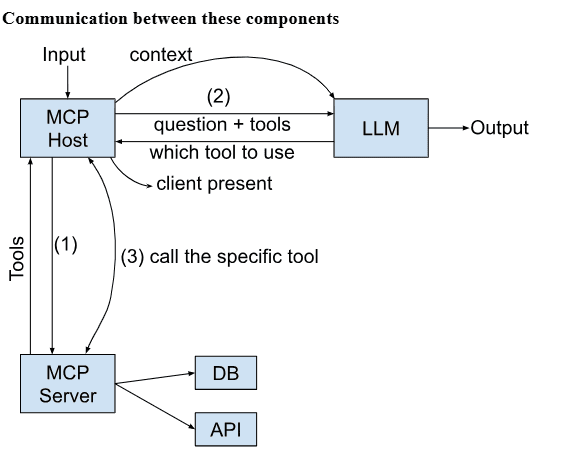
MCP Host (Orchestrator)
- Acts as the “middle layer” between the LLM and the tools.
- IDEs or any custom app can be the host.
LLM (Reasoner / Decision Maker)
- Decides which tool to use given the query and context.
- The large language model itself (e.g., GPT, Claude, LLaMA).
MCP Server (Connector / Bridge)
- The component that actually executes tool calls.
- Connects to real-world systems like databases, APIs, file systems.
Simple Example in Action
User: “What’s the current weather in Mumbai?”
MCP Host: Passes question + tool info to LLM: “Available tools: WeatherAPI, NewsDB.”
LLM: Decides to use WeatherAPI.
MCP Host → MCP Server: Calls WeatherAPI with “Mumbai.”
WeatherAPI Response: 31°C, humid, chance of rain.
LLM: Formats a natural answer → “It’s 31°C in Mumbai with high humidity and a chance of rain.”
Publicly Available MCP Servers
In my entire journey I have used Dive, an amazing open-source MCP Host desktop application that seamlessly integrates with any LLMs supporting function calling capabilities.
Let’s check out a few publicly available servers:
1. Filesystem
Working with files is usually a manual, click-heavy process. Open, scroll, search, repeat. With the MCP Filesystem server, that interaction becomes conversational. In my demo, I asked to to create a new file and write a joke in it. It does it perfectly.
This may sound small, but imagine the difference for developers or analysts. Instead of hunting through dozens of files, you can just ask: “Check if this config has hardcoded values” or “Summarize the contents of notes.txt.” The screenshots show exactly that: a file queried, read, and understood by the LLM, no extra steps needed.
2. SQLite
Databases often intimidate people who aren’t fluent in SQL. The MCP SQLite server lowers that barrier by letting you query a database in plain English. In my demo, I simply created a table and added data to it and then asked a question about the data.
What’s powerful here is the accessibility. Someone who’s never written SELECT * FROM table can still explore data, filter it, and learn from it, just by asking. The screenshot captures this perfectly: a simple question turned into structured output, without a single line of SQL.
3. Git
Anyone who codes knows the muscle memory of typing git status over and over. With the MCP Git server, that command line ritual turns conversational. In my test, I asked it to check the status of my repo, and it returned the current state immediately.
It’s a small but impactful shift. Instead of juggling commands, you can imagine asking follow-ups like “Show me the last three commits” or “Which branch am I on?” and having them answered in natural language. The screenshot shows the first step: status on demand, no extra typing.
Custom Servers: Real Magic of MCP
Now comes the custom part, where we can actually see the true magic of MCP in action. With custom servers, you’re no longer limited to the built-in tools—this is where MCP becomes fully adaptable to your workflows, apps, and data.
Imagine connecting your own databases, integrating with third-party platforms, or automating unique tasks that matter specifically to you. A custom server makes it possible to extend Dive AI far beyond the defaults and create a personalized experience.
In the video below, we’ll walk through the process of setting up a custom server step by step. By the end, you’ll see how simple it is to bring your own ideas to life with MCP.
What you just saw is only the foundation. Once you’ve built a custom server, you can start experimenting with practical use cases—turning everyday apps and workflows into conversational tools powered by MCP. From productivity apps to data queries, the possibilities are wide open.
Let’s look at some real examples of these custom MCP servers in action. You can check out the code for all these servers in the GitHub repo.
1. To-do Manager
To-do lists are most useful when they don’t get in your way. In my demo, I added two tasks through the MCP server, and within seconds, they synced to my Todoist web app.
The video captures this beautifully: tasks being created, then mirrored across apps. It feels like talking to your productivity system instead of clicking through menus. For anyone juggling work, studies, or projects, this kind of natural interaction makes staying organized effortless.
2. Recipe Finder & Meal Planner
This one was fun to test. I asked the MCP server to suggest some creative food ideas using chicken, and it quickly came up with multiple interesting options. From there, I asked it to narrow things down with short summaries, and later, to provide a complete step-by-step guide for one of them.
The video captures this flow in action: starting broad with discovery, moving into concise overviews, and then diving into detailed instructions. It highlights how MCP isn’t just about fetching information—it adapts and layers the experience, making it feel like an interactive cooking companion that responds to your curiosity.
3. Calendar Helper
Our custom MCP server integrates directly with Google Calendar, making schedule management seamless. In the demo, I was able to add new events and update existing ones right from the chat, without ever opening the calendar app or navigating through menus. It all happens naturally, through conversation.
This approach goes beyond simple calendar access—it gives you control over your schedule in real time. Whether it’s creating a new event or adjusting one that’s already planned, it feels like having a personal assistant who can manage your calendar the moment you ask.
4. Weather Checker
Instead of relying on quick searches, our custom MCP server connects directly with Weather API to deliver structured, reliable forecasts. In the demo, we checked the weather for Mumbai and then for Delhi, and each request returned clear, formatted results right inside the chat.
This setup shows how weather data can be accessed and understood effortlessly. Rather than scanning through different sites or apps, you get instant, accurate updates in a consistent format—making it simple to plan ahead with confidence.
5. Email Assistant
Email overload is real, but the Email Assistant MCP Server makes it manageable. We have used Gmail API and Dive AI to create a seamless email management experience. In my demo, I asked it to list my emails, then fetch the most recent one, and finally draft a reply. Each step is visible in the screenshots: inbox surfaced, message retrieved, response generated.
It feels like having a personal secretary for your inbox. Instead of clicking through threads and typing replies, you just ask:
“Show me the latest” or
“Reply politely with thanks.”
The assistant handles the rest.
6. PPT Maker
Slide preparation can be time-consuming, but the PPT Maker MCP Server makes it effortless. With Dive AI, you can generate professional presentations from simple prompts. Just describe the topic or structure you want, and the assistant builds slides with headings, bullet points, and even suggested visuals.
It feels like having a design assistant for your ideas. Instead of spending hours formatting, you just ask:
“Create a 5-slide deck on AI in education” or
“Make a pitch deck with problem, solution, and roadmap.”
Dive AI handles the layout, flow, and consistency—so you can focus on the message.
What’s Next?
MCP is still in its early stages, but its potential is undeniable. By creating a universal standard for how AI connects with external systems, MCP could become the foundation of the next generation of AI applications, just as USB transformed hardware connectivity.
In short, MCP is here, and it’s here to stay.